SysMLv2 is a next-generation systems modeling language by the OMG Standards Development Group. The API spec was finalized last year, and your models can now be exchanged as standardized JSON files.
That's the good news. The bad news is that "machine-readable" doesn't mean "machine-validated." But don't stress. Validibot can help!
This blog post describes how to set up a reusable validation pipeline in Validibot that checks your SysMLv2 artifacts from schema conformance all the way to checking outputs from an FMU-based simulation.
The New Problem with the New Standard
If you've been doing MBSE1 1 Model-Based Systems Engineering. It means using formal digital models (rather than documents) as the primary artifact for system design, analysis, and verification throughout the engineering lifecycle. for a while, you probably spent the last decade working with SysMLv1 models locked inside vendor tools. Interoperability meant XMI exports that no two tools agreed on, and "validation" meant eyeballing diagrams and hoping for the best.
SysMLv2 changes the game. The OMG finalized the spec in mid-2025, including the Systems Modeling API specification that defines a proper REST/HTTP interface for accessing, querying, and exchanging KerML and SysML models. Tools like SysON and PTC Modeler are already implementing it.
Your JSON-based models can now travel easily between tools or be stored neatly in your git repo. So good.
However, this creates a new category of problems. If you're passing a bunch of JSON files between tools, teams, and CI pipelines, you need to answer questions like: Is the JSON structurally sound? Are the engineering values physically valid? Does the model actually work when you run it through a simulation?
With SysML v1, these questions were the tool vendor's problem. With SysMLv2 and an open interchange format, they might be your problem.
Validibot to the Rescue
This is where Validibot comes in. Validibot is a no-code workflow builder for data validation. In this case, you can set up a reusable validation workflow that checks your SysMLv2 JSON file for structural conformance, engineering constraints, and simulation readiness, all in one pipeline.
So let's do an example of a Validibot workflow that validates a simple SysMLv2 model. Since space is cool,2 we'll do a toy example of a 2 Big fan of The Angry Astronaut. Big fan. spacecraft thermal radiator.
The Example: A Spacecraft Thermal Radiator
Let's imagine we're working with a thermal radiator panel (a flat plate that emits waste heat to deep space via radiation) governed by the Stefan-Boltzmann law.
Our example involves two separate artifacts. This distinction matters for understanding the validation story:
- The FMU simulation file: a thermal simulation file in FMU format. When you author your
Validibot workflow you load this FMU via a
FMUValidator. The FMU is used to verify that a SysMLv2 model produces physically sensible results. - The SysMLv2 model JSON: the SysMLv2 JSON file we need to validate. A user submits this to your Validibot validation workflow.
Let's start with the FMU first. For a primer on FMU models, check out the Validating Data with FMUs blog post.
The FMU is a reusable simulation component. Our imaginary simulation engineer wrote it (he used PythonFMU), packaged it as an FMI 2.0 Co-Simulation unit, and gave it to our workflow author, Roscoe, who then loaded it into Validibot.
The FMU takes inputs (solar irradiance, panel area, emissivity, absorptivity) and computes equilibrium temperature via Stefan-Boltzmann. Feed it a panel with ε=0.85 and α=0.20 at 1 AU, and it returns 274 K. That's about 1°C, right in the ballpark for a white-paint radiator in low Earth orbit.3 3 How do we know this? Standard spacecraft thermal control references list white paint at α≈0.20, ε≈0.92 (UH CubeSat Guide, §7.7). Our FMU uses those properties in the Stefan-Boltzmann equilibrium equation and returns 274 K, consistent with published values for white-paint radiators at 1 AU. The FMU exists on its own, just like any other simulation component in your toolchain.
The SysMLv2 model is the systems engineering representation. It defines
a RadiatorPanel part (area, emissivity, absorptivity, mass),
a ThermalEnvironment (solar irradiance),
a ThermalCoupling interface connecting them,
requirements for operating temperature range and mass budget,
and an analysis case that references the ThermalRadiator FMU.
Note that the SysMLv2 model doesn't create the FMU. It points to it and says "use this simulation with my parameter values." The FMU is the test engine; the SysML model provides the scenario.
Here's what our valid model looks like as JSON. This is the artifact that gets submitted to the Validibot workflow by your user:
{
  "@type": "sysml:Package",              // Top-level SysMLv2 package
  "@id": "pkg-thermal-radiator-subsystem",
  "name": "ThermalRadiatorSubsystem",
  "ownedMember": [
    {
      "@type": "sysml:PartDefinition",   // The physical radiator panel
      "name": "RadiatorPanel",
      "ownedAttribute": [
        { "name": "panelArea",     "defaultValue": 2.0,  "unit": "m²" },
        { "name": "emissivity",    "defaultValue": 0.85,  "unit": "dimensionless" },
        { "name": "absorptivity",  "defaultValue": 0.20, "unit": "dimensionless" },
        { "name": "mass",          "defaultValue": 3.6,   "unit": "kg" }
      ]
    },
    {
      "@type": "sysml:InterfaceDefinition",  // Connects environment to panel
      "name": "ThermalCoupling",
      "end": [                          // Must have exactly 2 ends
        { "partRef": "def-thermal-environment" },
        { "partRef": "def-radiator-panel" }
      ]
    },
    {
      "@type": "sysml:RequirementDefinition",  // Temperature constraint
      "@id": "req-thermal-range",
      "text": "Equilibrium temperature shall be between 150 K and 400 K."
    },
    {
      "@type": "sysml:SatisfyRequirementUsage",  // Links part to requirement
      "satisfiedRequirement": "req-thermal-range"
    },
    {
      "@type": "sysml:AnalysisCaseDefinition",  // Points to the FMU simulation
      "analysisAction": {
        "fmuReference": "ThermalRadiator.fmu"  // Must match workflow's FMU
      }
    }
  ]
}
Validibot Workflow
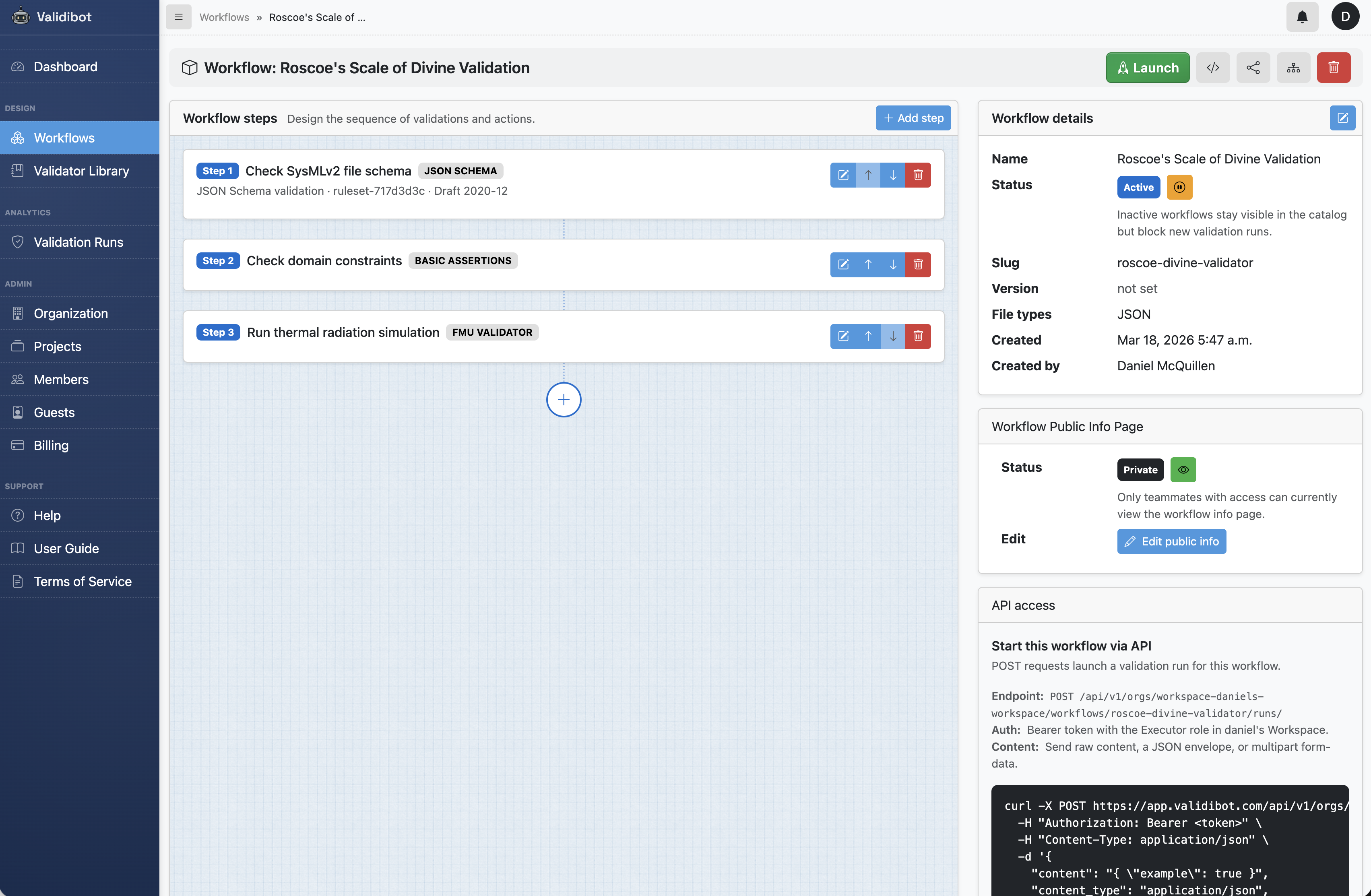
Roscoe the modeller has found himself responsible for validating incoming SysMLv2 models before they get integrated into the main branch of the model repository. He's been manually checking incoming models and yesterday Roscoe decided he's done with that.
To make his life easier, he's set up a workflow in Validibot for checking the models automatically. He names the workflow "Roscoe's Scale of Divine Validation," as he is a sensitive man with a poetic sensibility that is under-utilised and misunderstood by his peers.
Roscoe's workflow has three validation steps:
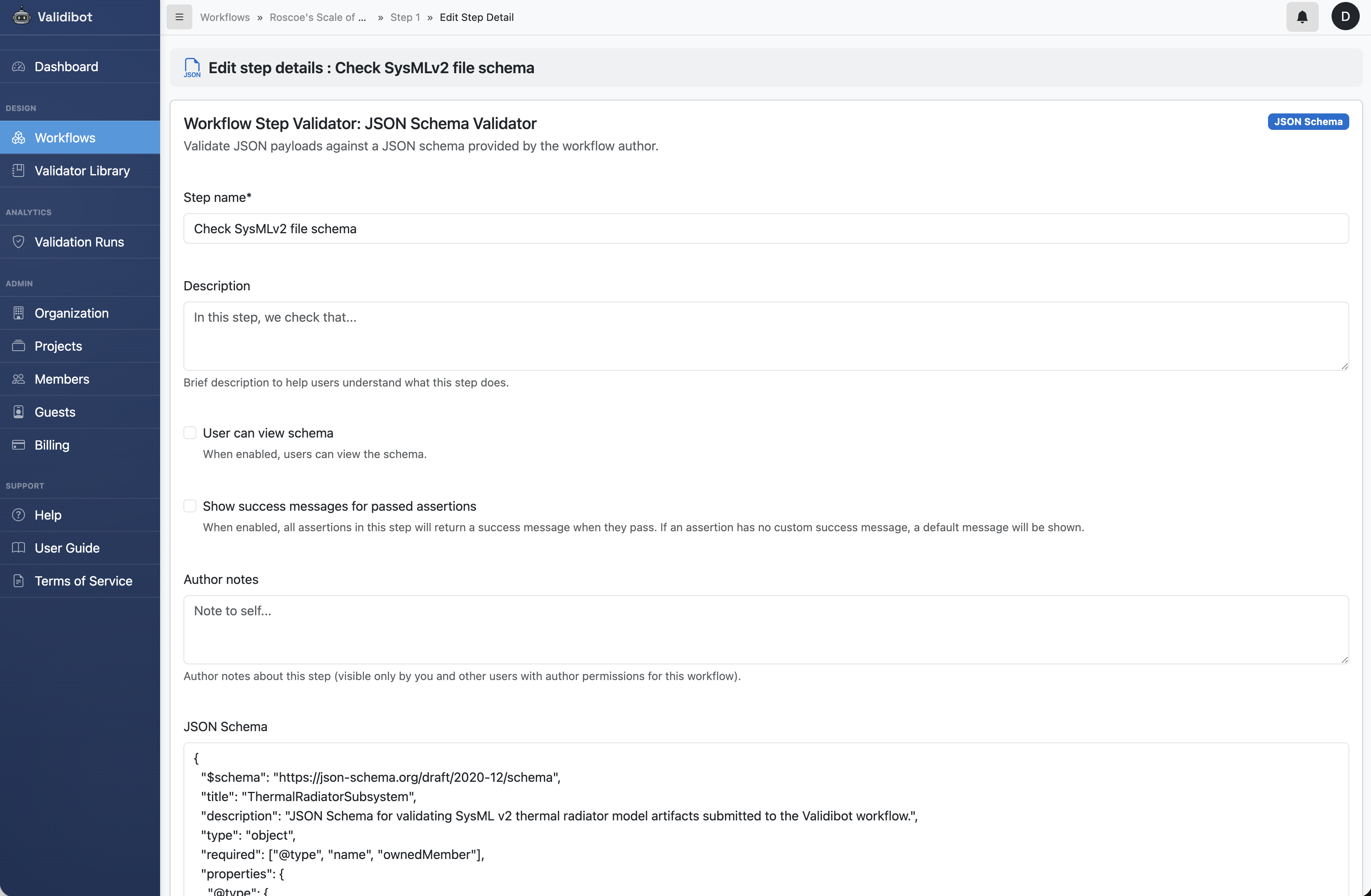
- JSON Schema Check. Validates the structure of the incoming JSON
against a JSON Schema. This schema confirms the model's
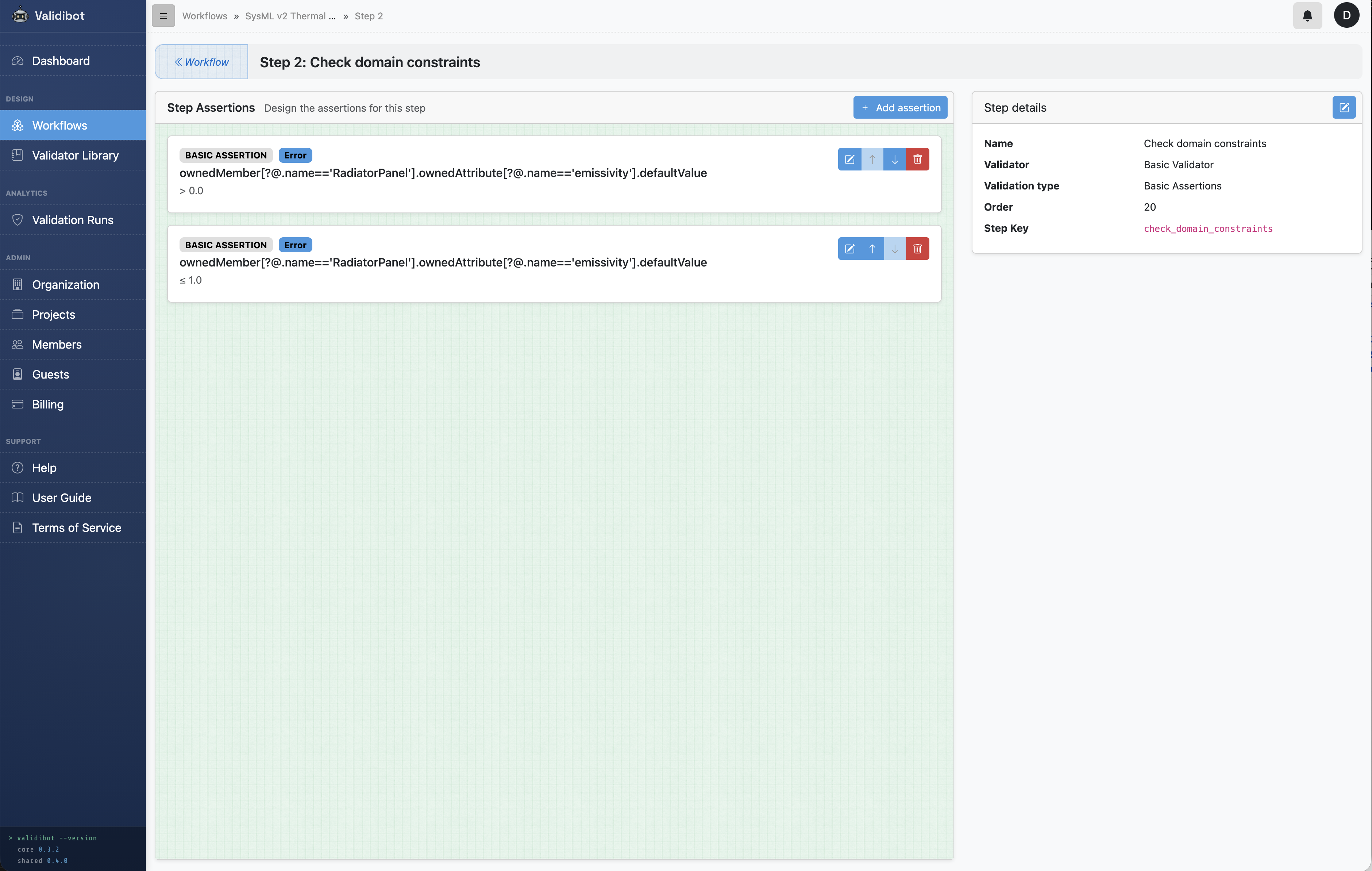
fmuReferencematches the workflow's preconfigured FMU (ThermalRadiator.fmu). - Basic Assertion Check. Validates domain constraints on the model data: physical plausibility of values, interface completeness, requirement traceability.
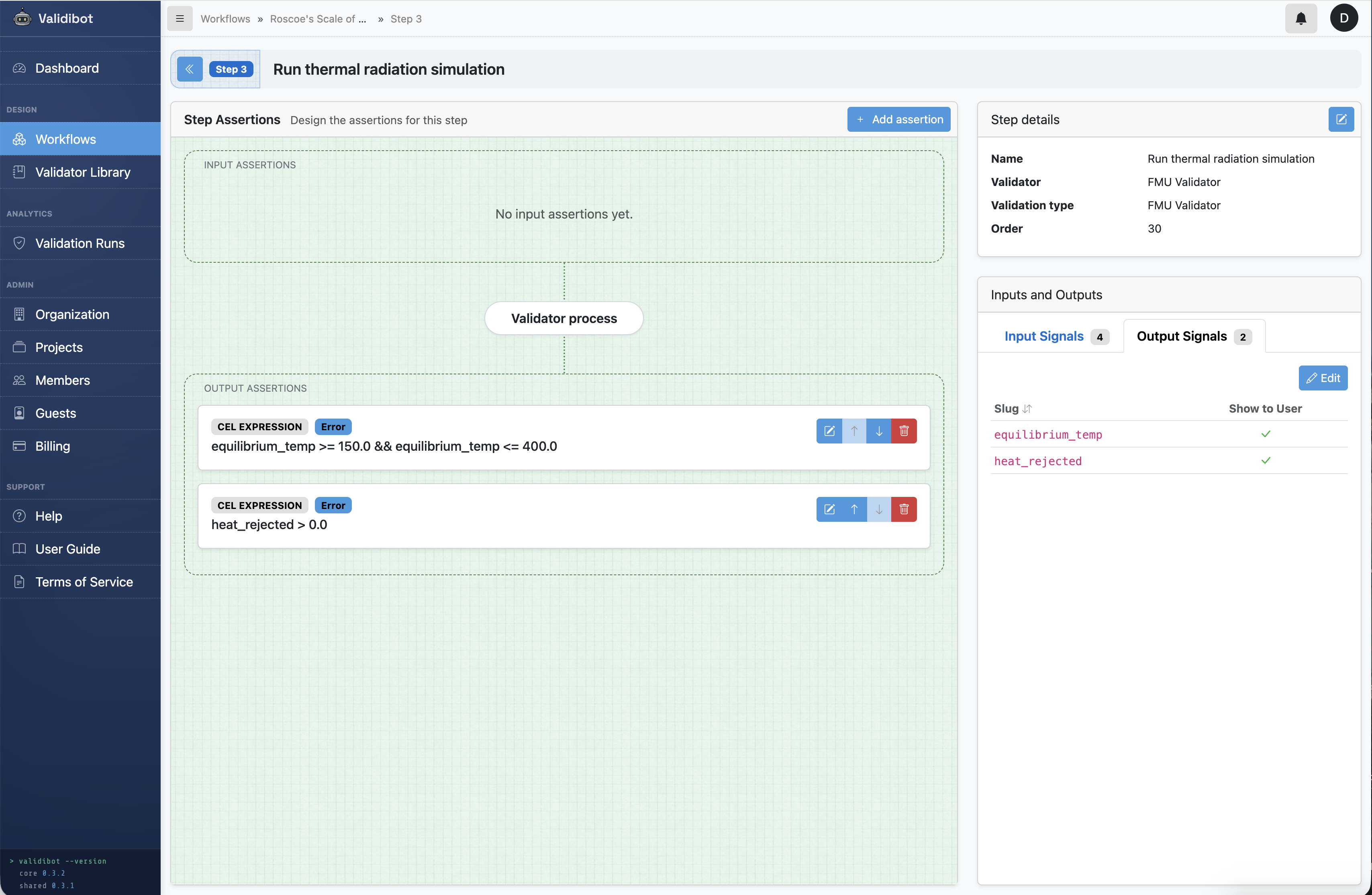
- FMU Simulation. Runs the preconfigured ThermalRadiator FMU with the model's property values, then checks whether the output falls within a physically sensible range.
Each step only runs if the previous one passed. If the JSON is malformed or references the wrong FMU, there's no point checking domain values. If the domain values are invalid, there's no point running the simulation.
Now that Roscoe has built this workflow, he invites team members from his organization's account in Validibot to access it. They can now submit their SysMLv2 files directly to this workflow, using the web form, the API or the CLI, and Validibot will automatically check them against the rules in the workflow.
Now let's imagine three different user submissions, each of which fail validation in a different way...
Submission 1: Failing Schema Conformance
Validibot's JSON Schema Validator is the first step in Roscoe's workflow. The schema
checks element types, required fields, and value types. In this particular case, one of the things the schema
does is verify that the model's
fmuReference matches the workflow's preconfigured FMU.
Here's the actual schema we're using for this workflow:
{
  "$schema": "https://json-schema.org/draft/2020-12/schema",
  "title": "ThermalRadiatorSubsystem",
  "type": "object",
  "required": ["@type", "name", "ownedMember"],
  "properties": {
    "@type": { "const": "sysml:Package" },  // Must be a SysML Package
    "ownedMember": {
      "type": "array",
      "items": {
        "required": ["@type"],
        "properties": {
          "@type": {
            "enum": [                       // Only these element types are allowed
              "sysml:PartDefinition",
              "sysml:InterfaceDefinition",
              "sysml:RequirementDefinition",
              "sysml:SatisfyRequirementUsage",
              "sysml:AnalysisCaseDefinition"
            ]
          }
        },
        "allOf": [
          {
            // PartDefinitions must have named attributes with numeric values
            "if": { "properties": { "@type": { "const": "sysml:PartDefinition" } } },
            "then": {
              "required": ["name", "ownedAttribute"],
              "properties": {
                "ownedAttribute": {
                  "items": { "required": ["name", "defaultValue"] }
                }
              }
            }
          },
          {
            // AnalysisCaseDefinition must reference our FMU
            "if": { "properties": { "@type": { "const": "sysml:AnalysisCaseDefinition" } } },
            "then": {
              "required": ["analysisAction"],
              "properties": {
                "analysisAction": {
                  "required": ["fmuReference"],
                  "properties": {
                    "fmuReference": { "const": "ThermalRadiator.fmu" }
                  }
                }
              }
            }
          }
        ]
      }
    }
  }
}
The relevant line for our example is at the bottom:
"fmuReference": { "const": "ThermalRadiator.fmu" }.
This pins the FMU reference to the specific simulation this workflow uses.
Our first submission demonstrates what a schema failure looks like. This model is structurally identical to the
valid one, except the fmuReference points to the wrong FMU:
  ...
    {
      "@type": "sysml:AnalysisCaseDefinition",  // Analysis case with FMU reference
      "analysisAction": {
        "fmuReference": "SomeOtherSimulation.fmu"  ✗ expected ThermalRadiator.fmu
      }
    }
  ...
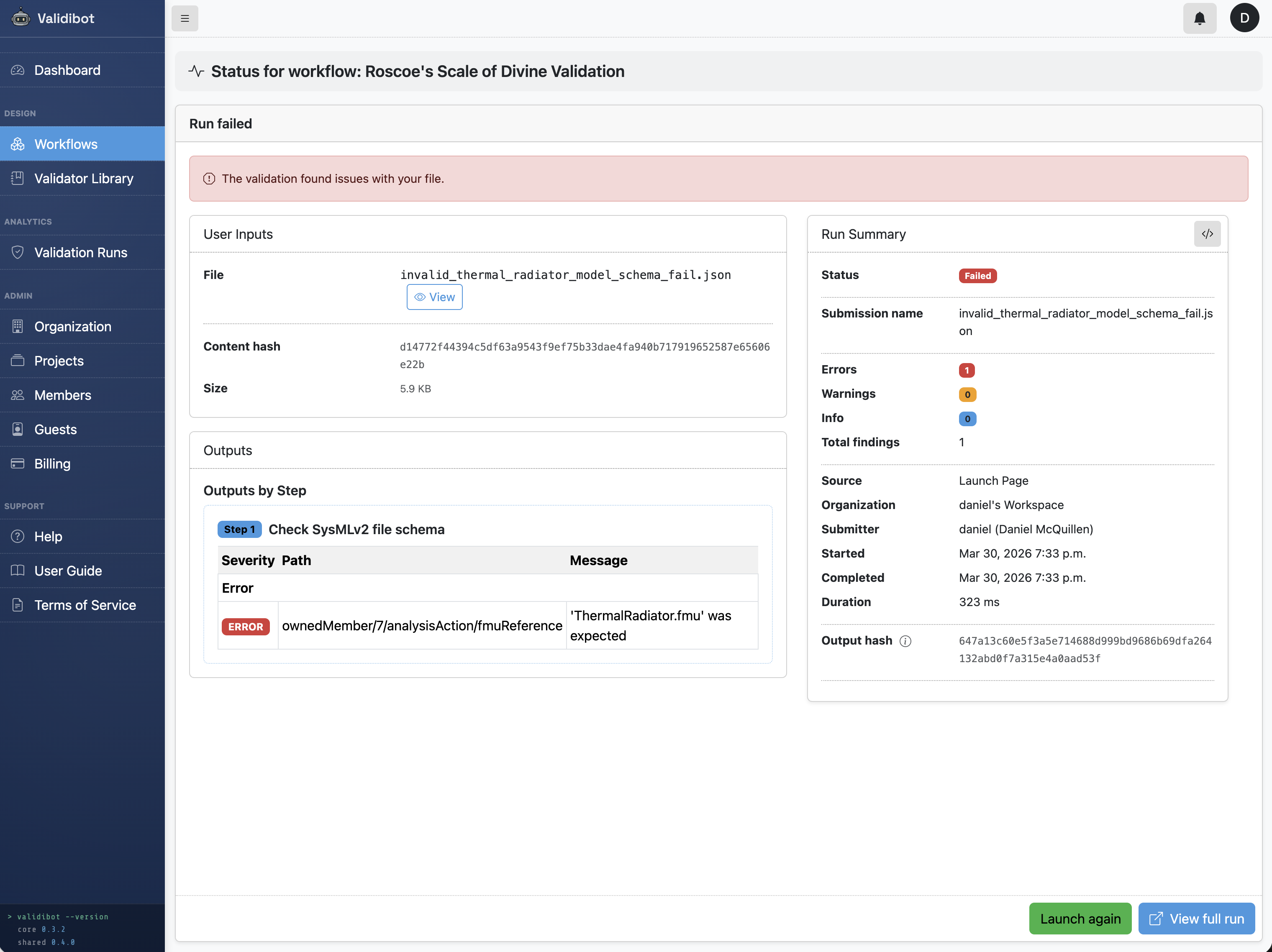
The workflow stops immediately. Someone submitted a model that was built for a different simulation. Running it against ThermalRadiator.fmu would produce meaningless results. The schema check catches it before any computation happens.
Submission 2: Failing Domain Constraints
Schema conformance tells you the JSON is well-formed. It doesn't tell you whether the values make sense from an engineering perspective. Validibot's Basic Assertion Validator lets you write rules that express physics and engineering intent.
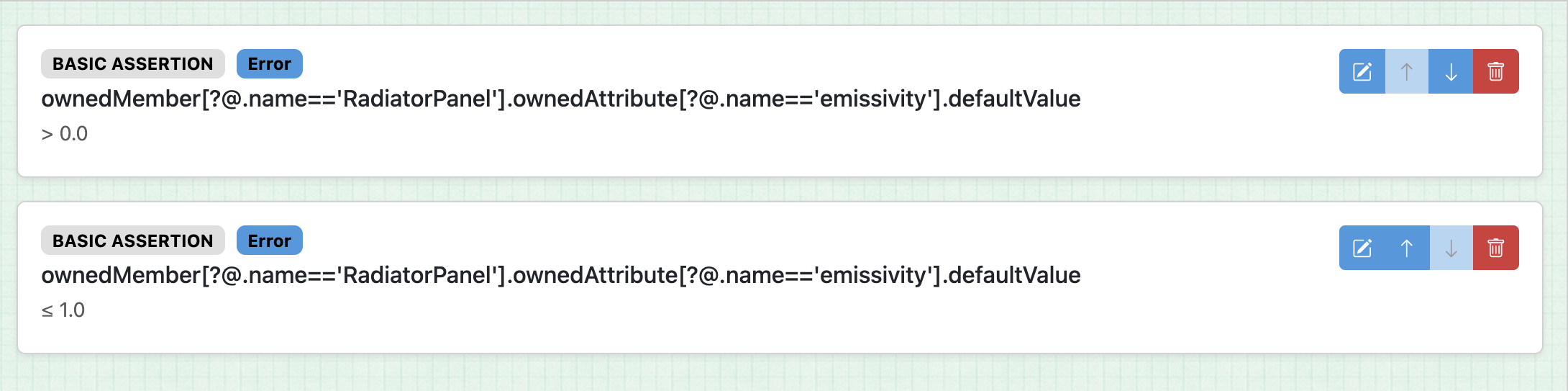
So in this case we want to grab the value of the incoming emissivity and make sure it fits our expectations. We want it to be greater than 0 and less than or equal to 1. (Because physics tells us that's necessary.)
Here we take a quick aside about finding stuff in JSON. Now usually with Validibot you can just use a CEL expression to define your assertions. CEL statements are quick and easy. If you have a data structure like
{
    "something": {
        "my_variable": 1
    }
}
... you can use my_variable <= 1 in a CEL expression and Validibot knows what to do ... it will dig
down and find my_variable and compare it to 1 (and give an error if there's a name collision or it
can't find the name you defined).
But unfortunately for us, and Roscoe, our SysMLv2 json uses a data structure with "name" and "value" keys,
rather than a key and value like "name": value. For example, the default emissivity value comes
in with a submission like this:
{
    "@type": "sysml:AttributeUsage",
    "@id": "attr-emissivity",
    "name": "emissivity",
    "attributeType": "kerml:Real",
    "defaultValue": 0.5,
    "unit": "dimensionless",
},
So we can't use CEL expressions here (CEL doesn't really support filtering expressions). But that's no problem. We can just use a "basic" assertion. In Validibot, a basic assertion allows full JSON path descriptions for the target path to the data, including filters. It's a little verbose, but we can define the path we need here like this using the JSONPath syntax:
ownedMember[?@.name=='RadiatorPanel'].ownedAttribute[?@.name=='emissivity'].defaultValue
Let's look at that second step again. We can see Roscoe has set up two basic assertions to make sure emissivity is in the range he wants, between 0 and 1 inclusive.
Now back to our submitters. Our second submitter sends in data that passes the schema check (correct structure, right FMU reference) but has one constraint violation:
{
  "@type": "sysml:Package",
  "name": "ThermalRadiatorSubsystem",
  "ownedMember": [
    {
      "@type": "sysml:PartDefinition",       // Radiator panel properties
      "name": "RadiatorPanel",
      "ownedAttribute": [
        { "name": "panelArea",     "defaultValue": 2.0,  "unit": "m²" },
        { "name": "emissivity",    "defaultValue": -0.5,  ... },  ✗ negative emissivity
        { "name": "absorptivity",  "defaultValue": 0.20, ... },
      ]
    },
   ... (snip)...
  ]
}
Here's what that result looks like if the submitter used the Validibot web UI to submit data to the workflow:
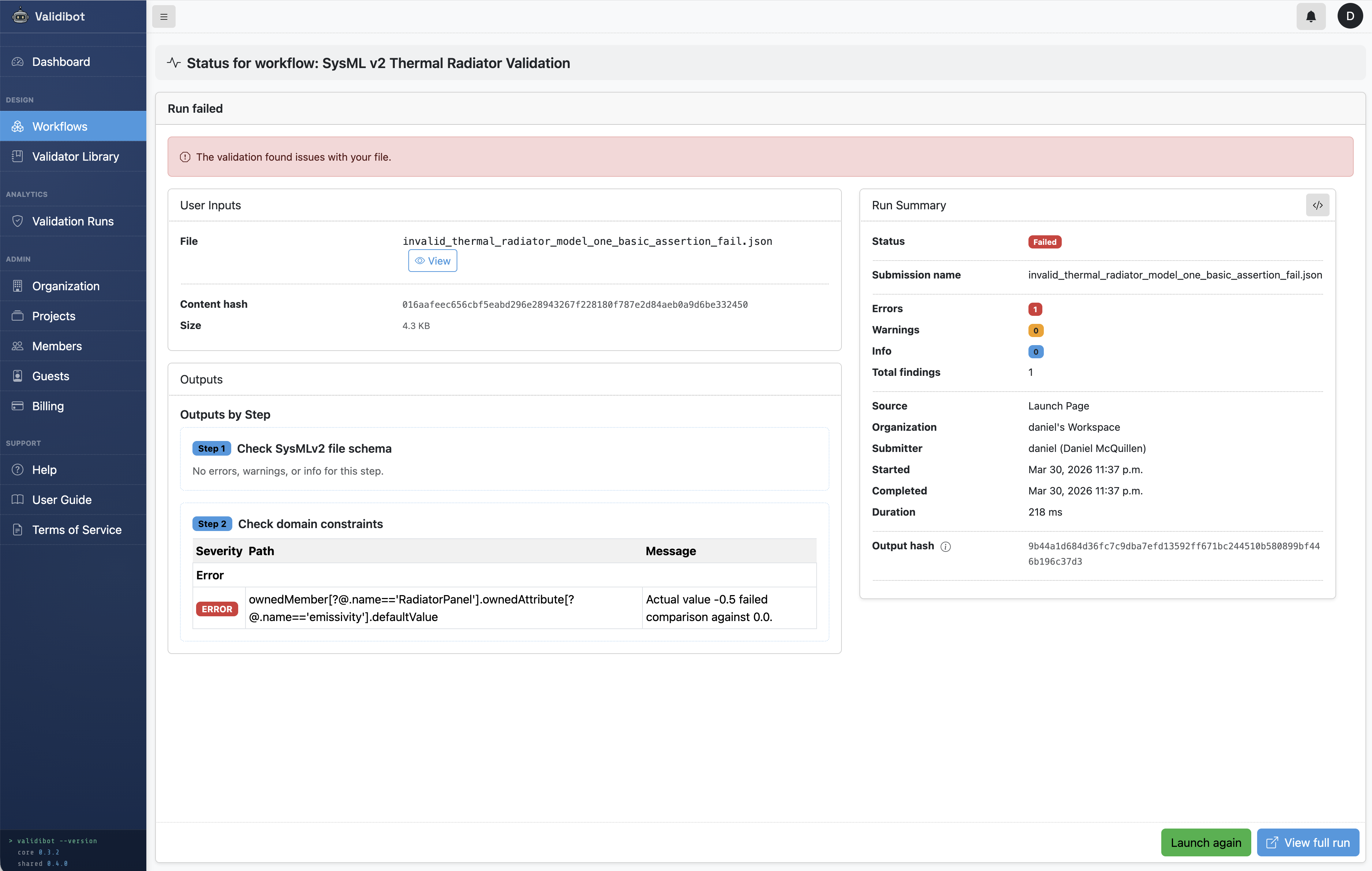
The negative emissivity would cause the FMU to return NaN downstream. This step catches the problem before we waste time running a simulation that will produce garbage output. The submitter gets a clear error message about the invalid value and can fix it before resubmitting.
Submission 3: Failing Simulation Validation
This is where the incoming SysMLv2 model and the FMU come together. The workflow runs the preloaded FMU with values pulled from the submitted model and checks whether the output is physically sensible.
Our third submission passes both previous layers. The structure is correct, the FMU reference matches, and every individual value is in a valid range. But the combination of values is bad:
  ...
      "ownedAttribute": [                                  // Each value passes basic assertion on its own...
        { "name": "panelArea",     "defaultValue": 2.0,  "unit": "m²" },
        { "name": "emissivity",    "defaultValue": 0.02,  ... },  ✗ technically valid, but...
        { "name": "absorptivity",  "defaultValue": 0.85,  ... },  ✗ ...this ratio will melt stuff
        { "name": "mass",          "defaultValue": 3.6,  "unit": "kg" }
      ]
  ...
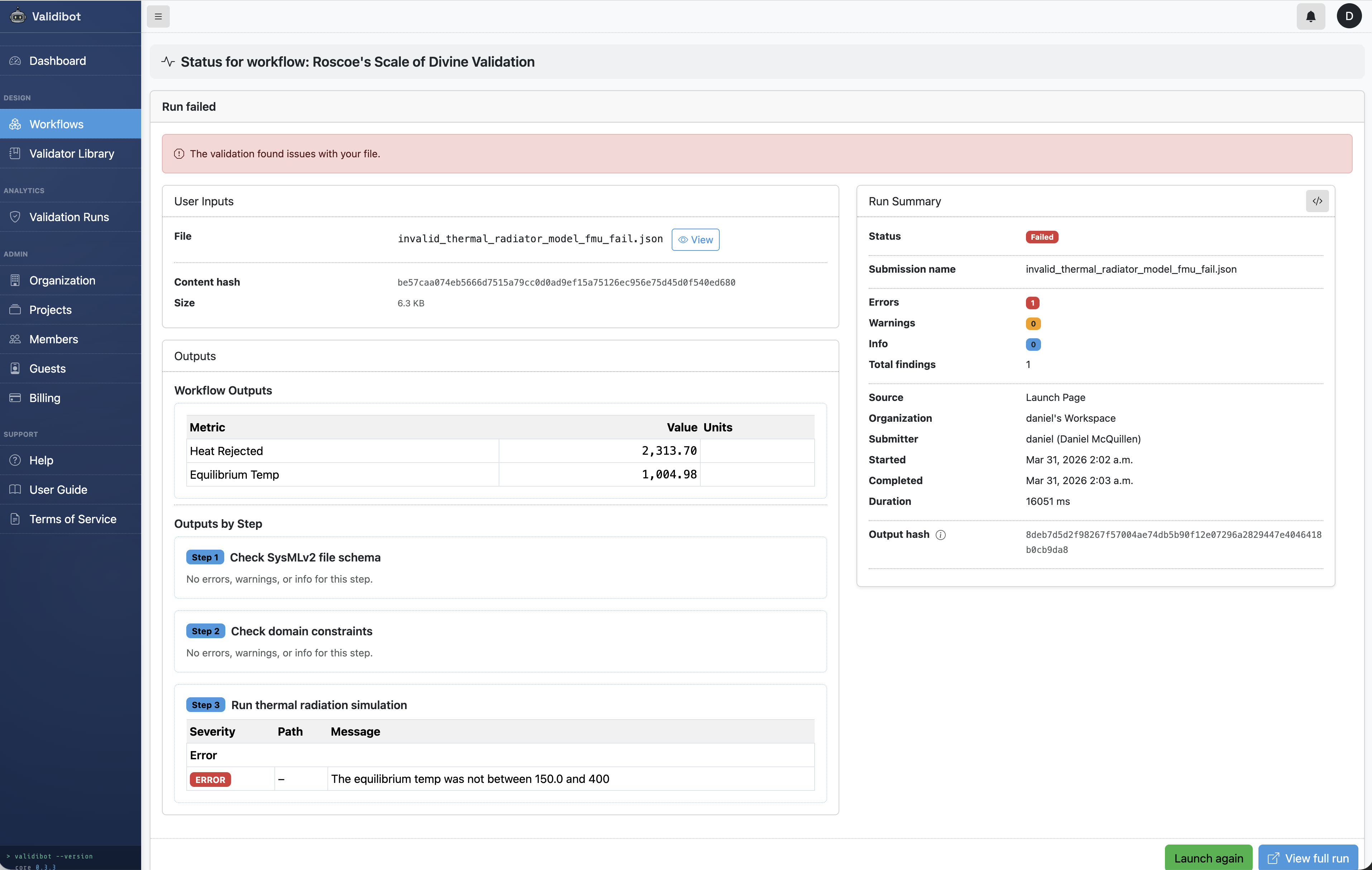
Emissivity of 0.02 is positive and ≤ 1, so it passes the basic assertions. Absorptivity of 0.85 is also in range. But a surface that absorbs 85% of solar energy while emitting only 2% as infrared radiation would reach an equilibrium temperature of ~1005 K. That's over 700°C. The radiator coating would have melted long before.
The FMU runs and produces output signals (equilibrium_temp
and heat_rejected). Roscoe has written CEL
expressions in this workflow step to define what "sensible" means:
// Equilibrium temperature must be within the survivable range
// for spacecraft thermal control coatings (150-400 K)
equilibrium_temp >= 150.0 && equilibrium_temp <= 400.0

// Heat rejected must be positive (a radiator that rejects no heat isn't working)
heat_rejected > 0.0
So now with submission 3 the FMU returns equilibrium_temp = 1005 K. The CEL expression evaluates
to false and the workflow fails validation and returns an error message.
This is the kind of error that only shows up when you actually run
the simulation. No amount of static checking on the JSON alone would catch it.
Compare this with the valid model (ε=0.85, α=0.20), where the FMU returns 274 K, about 1°C, which is probably ok for a white-paint radiator in low Earth orbit.
Submission 4: A Valid Submission!
A final submitter sends in good data (finally!) that passes all three steps. The JSON is valid, the values are in range, and the FMU returns a sensible equilibrium temperature of 274 K. The workflow returns a success message and submitter now knows with confidence that the values won't break downstream analyses or simulations.
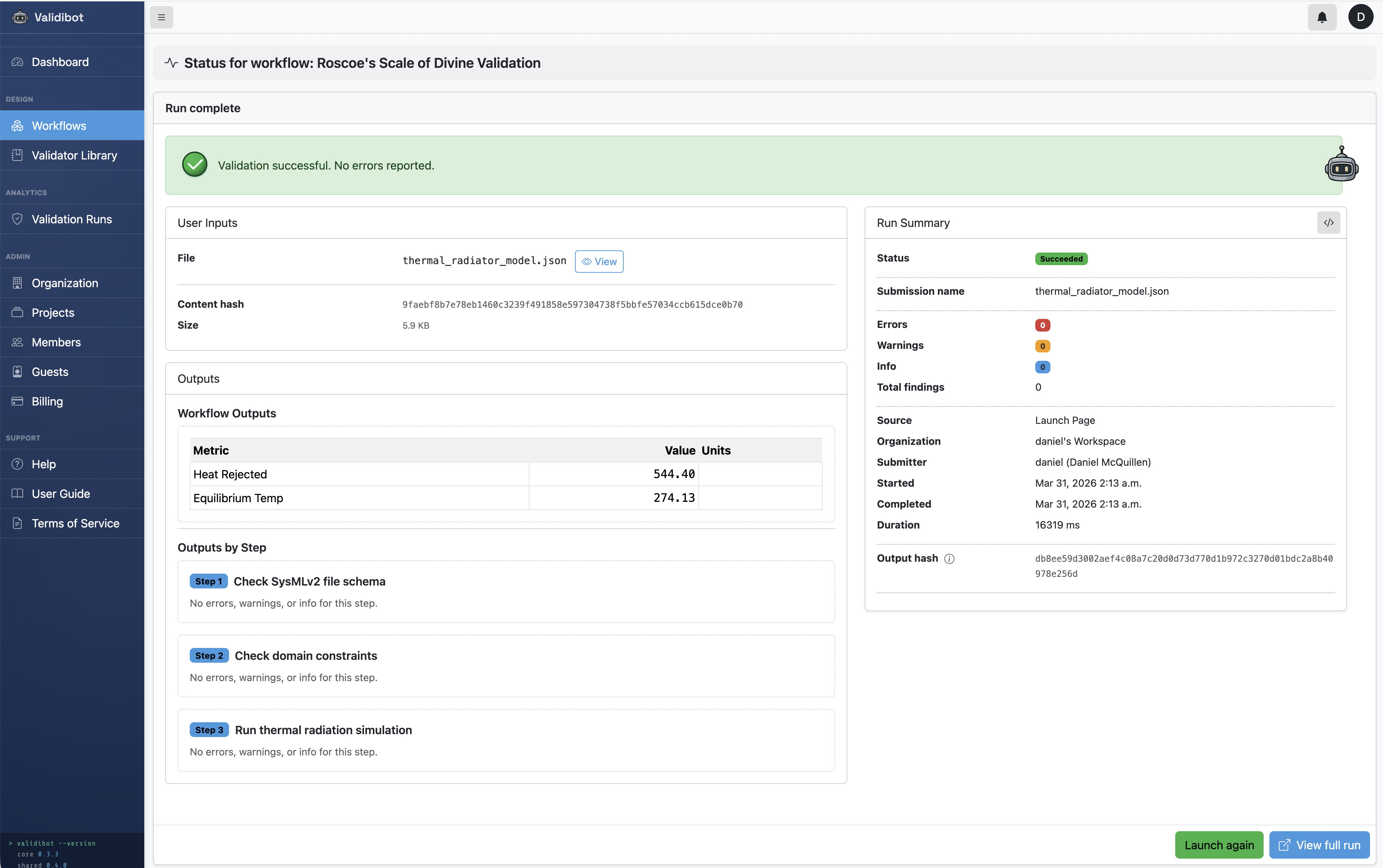
So all four submissions were returned to their users with helpful error messages. The submitters and Roscoe are all happy, in their own way.
Try It Yourself
This example is available in the open source Validibot GitHub repository, including the valid model, all three invalid variants, the FMU source, and the basic assertion rules.
Who This Is For
If you're on a team adopting SysMLv2 and thinking about how model artifacts will move between tools, teams, or CI systems, Validibot provides the kind of validation infrastructure that can help you avoid issues, especially if you're integrating models from multiple tools, generating FMUs from SysML models, or working in a regulated domain where traceability from requirements to validated models is helpful.
Validibot is open-source (AGPL) at its core, with commercial tiers for teams that need shared workflows, verifiable credentials, and audit logs. You can try it out or get in touch if you want to talk about your specific MBSE validation challenges.