If you've taken e-Learning courses here and there, you've probably come across completion "badges" awarded for finishing a course. They're shiny and official-looking, with ribbons and gold trim and flair. Ribbons and flair are great, but what's way cooler is the internal, cryptographically signed data object that anybody can use to verify that, yes indeed, you're not just a poser. You did finish the course. (Badges may seem trivial, but they're actually proven to motivate students to finish courses.1 1 A 2024 study of over 25,000 learners on the Open University's OpenLearn platform found that digital badges significantly motivate course completion. See: Law, P. & Storrar, R. (2024). Distance Education, 46(2). )
I've been thinking about this recently and how users of Validibot, or better yet the people they need to impress, might often say: "Ok, this data passed. But how do I prove that later? More importantly, how does my client, Robert, prove it when I send him the data? Robert needs proof. It's always Robert."
Maybe you're an energy consultant submitting a building model to a compliance authority. Maybe you're a manufacturer providing test data to a certification body. Maybe you're a software team that needs to show an auditor that an FMU's outputs stayed within spec. In all of those cases, the validation result isn't just for you; it's for someone downstream like Robert who needs to trust it.
So I've added a new 'verifiable credentials' action into Validibot2 2 There are two kinds of steps you can add in a Validibot validation workflow: A "Validator" step that checks data and an "Action" step that does something like send a Slack message or, in this case, create a verifiable credential. . When your data passes a workflow, you can now download a cryptographically signed, machine-verifiable credential that says exactly what was checked, when, and what the result was. No phone calls, no PDF screenshots, no "trust me, it passed."
Wait, What's a Verifiable Credential?
A Verifiable Credential (VC) is a W3C standard for tamper-evident digital documents. Think of it as the digital version of a stamped certificate or signed inspection report, except anyone can verify it without contacting the issuer. The standard has been around in various forms, but the latest version — VC Data Model 2.0 — is what we're using.
In terms of our earlier badge example, think of a VC as the data portion of the badge, without the visual flair. (No flair? Don't worry. If you really like flair, there's a separate spec by 1EdTech called Open Badges 3.0 that describes how to create visual badges using the VC standard. We'll be adding visual badges to Validibot soon.)
VC 2.0 defines a clean JSON structure with three participants involved:
- Issuer — creates and signs the credential. In this case, this is Validibot, on behalf of the organization running the validation.
- Holder — receives the credential and can share it. In this case, this is the Validibot user who submitted data to the validation workflow and got a SUCCESS result and a link to the credential.
- Verifier — this is the person who later on receives the credential somehow (maybe the holder emailed it) and checks the signature to make sure it's valid. This person might be a regulator, a client, a CI pipeline ... basically whoever the holder cares to share the credential with.
The VC is surprisingly small. It's secured as a
JWS compact serialization, a single
string that encodes the credential data and the cryptographic signature together. The media type is
application/vc+jwt, and the whole thing is about 1–2 KB. Small enough to
fit in an HTTP header or a QR code.
What Does Validibot's Credential Actually Say?
Here's the key idea. The credential doesn't contain your data. It contains a cryptographically signed message about your data. Specifically, it says:
"This exact data (identified by its SHA-256 hash) was submitted to this exact workflow and passed all validation checks at this exact time."
The credential references the submitted data by its hash3 3 A "hash" is a fixed-length digital fingerprint of a file. Feed in a small 2 MB spreadsheet or a massive 1 GB simulation model and you get back the same short string of characters. Change even one byte of the original file and the fingerprint changes completely. See Cloudflare's explanation for a friendly deep dive. , not by actually embedding the data. A credential for a large 1 GB FMU binary is the same size as one for a tiny 1 KB JSON file. And the credential is safe to share publicly because it contains no submission content, no project names, and no personal information.
So what about Robert? If he has the original file and the VC created when the file was validated, he can verify the credential himself — no Validibot account needed. But don't worry, we know he's lazy so we've made a nice page for quick verifications. (More on that below.)
How It Works in Practice
Let's walk through an example using Validibot. Say you've set up a Validibot workflow called "Baseline epJSON validation" that checks EnergyPlus input files against a JSON schema and some custom assertions. Here's how you'd set up your workflow:
- You set up your JSON schema step and basic assertions step, like usual. Maybe you're making sure the user's input is structurally correct and the data has some values that you want to be in a certain range.
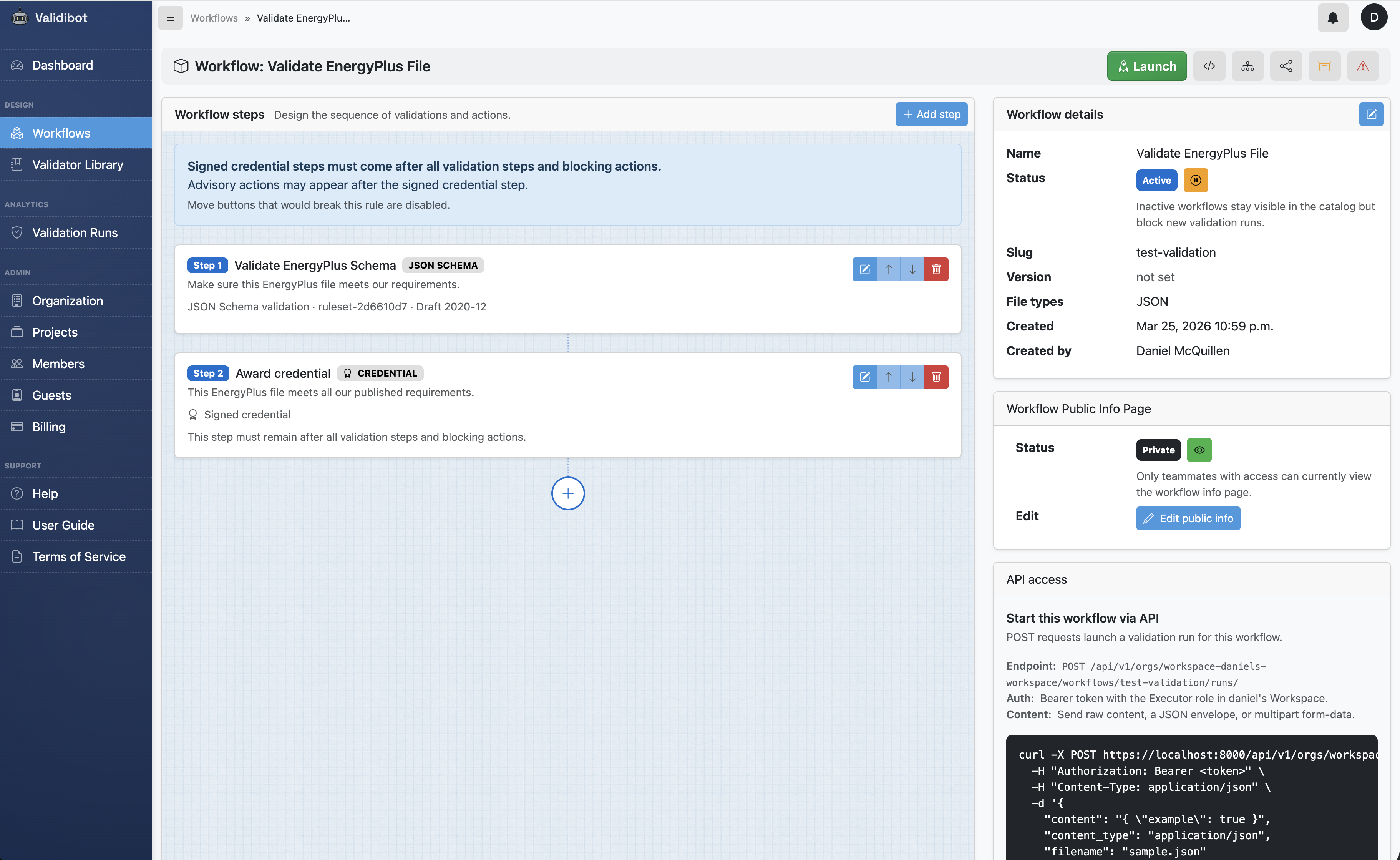
- You add a "Signed credential" step to your workflow after all your validation steps. This is a one-time setup in the workflow editor.
- You publish your workflow and tell your user to validate their epJSON file using it
- A user submits their file and launches the workflow. Validibot runs all the validation steps as usual.
- If everything passes, the last "credential" step fires. Validibot computes the hashes, builds a VC 2.0 object, and signs it with its private key.
- The credential appears on the run detail page with a download button (if the user used the web interface. If they used the API, it's provided as a full URL).
If the run fails? No credential is issued. Simple as that. The existence of a credential is itself proof that the workflow succeeded.
Under the Hood: Layered Integrity
If you're curious about how the actual data is composed into the VC, it's pretty simple. The design uses a layered hash model, similar in spirit to how Git chains blobs, trees, and commits:
- Layer 1 (Content Hash): SHA-256 of the raw submitted bytes. This part answers the question: "what exact data was validated?"
- Layer 2 (Workflow Hash): hash of the content hash plus the exact workflow definition that was applied. This part answers the question: "what was this data checked against?"
- Layer 3 (Output Hash): hash of the workflow hash plus the run outcome (status, timestamps, finding counts). This part answers the question: "what result did the validation produce?"
- Layer 4 (Signature): the JWS signature that binds the whole payload into one verifiable artifact.
Each layer incorporates the hash of the layer below it, creating a chain where tampering at any level is detectable. The credential is the root of trust. There's no separate "master hash" because the signature already covers everything.
Here's an abbreviated example of the VC payload that gets signed:
{
  "@context": [
    "https://www.w3.org/ns/credentials/v2"  // W3C VC 2.0 standard
  ],
  "type": [
    "VerifiableCredential",
    "ValidibotValidationCredential"
  ],
  "issuer": {
    "id": "https://app.validibot.com",      // The Validibot instance that signed this
    "name": "Validibot"
  },
  "validFrom": "2026-03-24T12:34:56Z",      // When the credential was issued
  "credentialSubject": {
    "id": "urn:validibot:sha256:4b0c7f6d...",
    "resourceDigest": {
      "algorithm": "sha-256",
      "value": "4b0c7f6d..."                // The hash of the submitted data (Layer 1)
    },
    "validationRun": {
      "result": "PASS",                     // All checks passed
      "workflow": {
        "slug": "baseline-epjson",           // The slug you gave your workflow
        "version": "3",                      // Updated each time you revise the workflow
        "name": "Baseline epJSON validation"
      },
      "findingCounts": {
        "errors": 0,                         // Zero errors (otherwise no credential!)
        "warnings": 2,                       // Warnings don't block a PASS
        "info": 1
      }
    }
  }
}
Notice what's not in there: no file contents, no user names, no project identifiers. The subject of the credential is the data (identified by its hash), not a person. That's intentional — it keeps the credential safe to share and focused on the thing that actually matters: the validation outcome.
Verification, With or Without Validibot
Every Validibot instance publishes its public key at /.well-known/jwks.json.
If your verifier is nerdy, they can take the credential file, fetch that public key,
and check the VC signature using any standards-compliant JWS library. That works
in Python, JavaScript, Go, Rust...any language with a
JOSE4
4 JOSE (JSON Object Signing and Encryption) is the umbrella name
for the IETF standards that define how to sign and encrypt JSON data.
JWS (signed tokens), JWK (key format), and JWA (algorithms) are all
part of it. See the
IETF JOSE working group for the full set of RFCs.
implementation.
So what does that look like for Robert? Say you send him your submission data
and the VC. He computes SHA-256 of the original file and compares it to the
resourceDigest.value field in the payload (shown in the example
above). If they match, he knows the credential is about this exact file.
Then he checks the JWS signature against the public key from the Validibot
instance's JWKS endpoint to confirm the VC hasn't been tampered with.
Two checks, no special tooling, no Validibot account needed.
Here's what that looks like in practice. Say Robert has Python installed and
receives your credential.jwt file along with the original data file.
He can verify everything in a few lines:
# 1. Install a JOSE library (one-time setup)
pip install PyJWT cryptography requests

# 2. Grab the issuer's public key from their JWKS endpoint
python3 -c "
import jwt, requests, hashlib, json, sys

# Fetch the public key
jwks = requests.get('https://app.validibot.com/.well-known/jwks.json').json()
key = jwt.algorithms.RSAAlgorithm.from_jwk(jwks['keys'][0])

# Read the credential
token = open('credential.jwt').read().strip()

# Verify the signature and decode the payload
try:
    payload = jwt.decode(token, key, algorithms=['RS256'], options={'verify_aud': False})
    print('Signature is valid.')
    print(json.dumps(payload, indent=2))
except jwt.InvalidSignatureError:
    print('INVALID signature -- credential may have been tampered with.')
    sys.exit(1)

# Check the file hash matches
file_hash = hashlib.sha256(open('my_data_file.epJSON', 'rb').read()).hexdigest()
credential_hash = payload['credentialSubject']['resourceDigest']['value']

if file_hash == credential_hash:
    print('File hash matches -- this credential is about this exact file.')
else:
    print('Hash mismatch -- this credential is NOT about this file.')
That's it. No Validibot SDK, no proprietary tooling. Any language with a JWT library can do the same thing — the point is that verification is just standard cryptography, not a vendor lock-in.
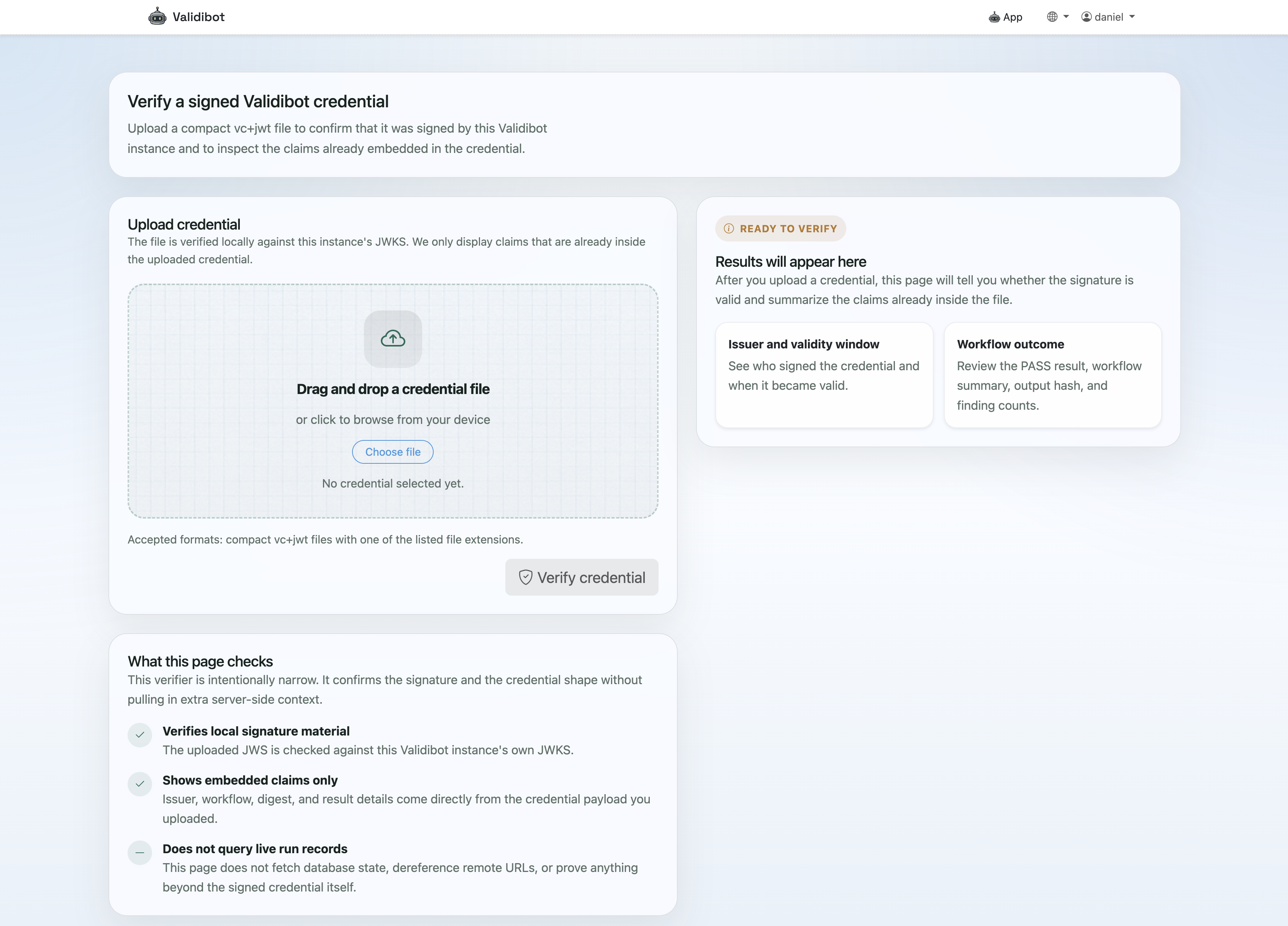
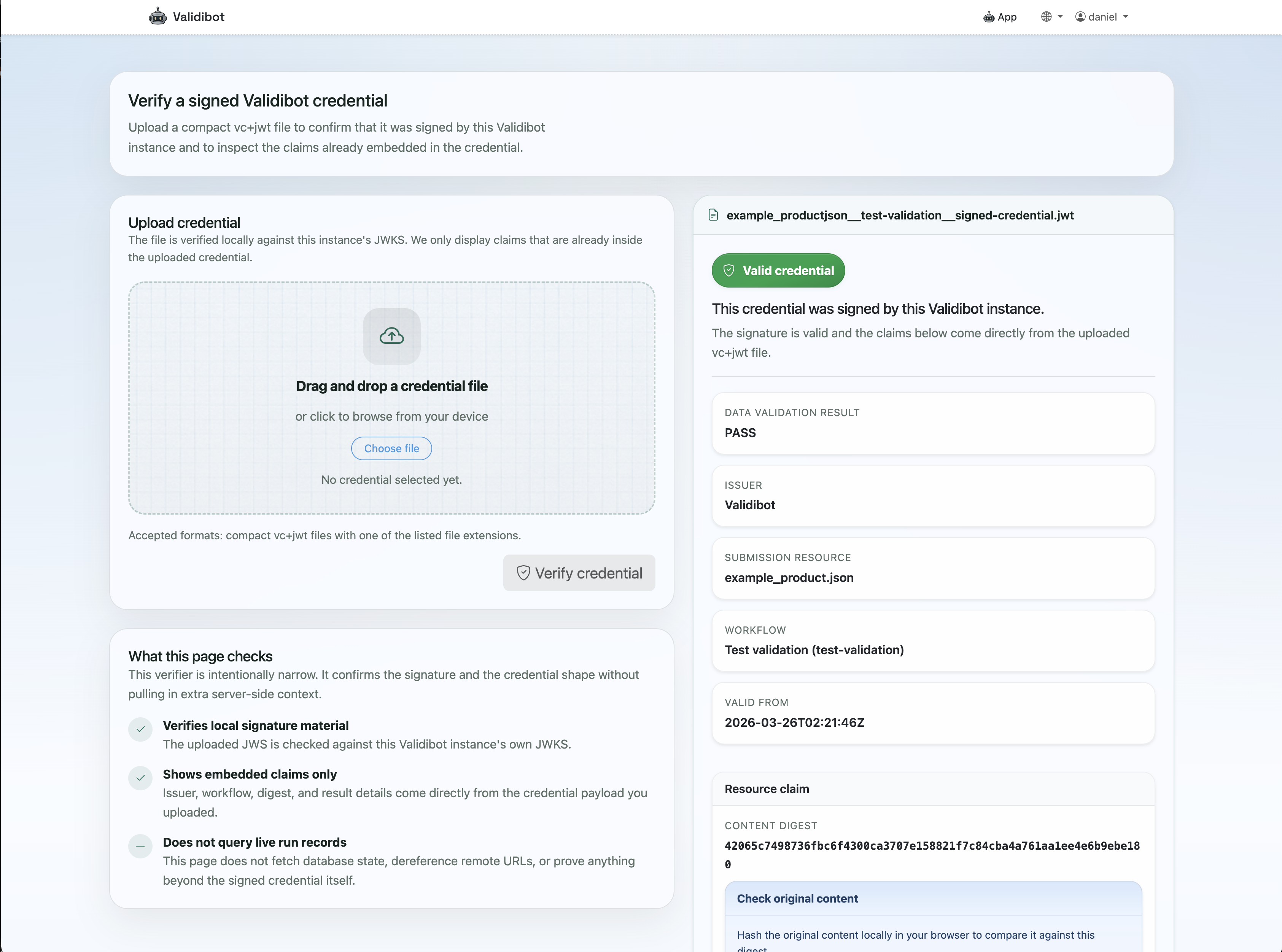
But why go through all of that? For the lovers of convenience (Robert), Validibot provides a simple,
publicly-available verification
page at /credentials/verify/ where you can upload a credential file and
get an instant "Valid" or "Invalid" result.
A thought that should be creeping up in your mind is "What if we stop using Validibot?" What happens to people who still need to verify last month's VCs?
Don't worry — you
don't need a Validibot account to verify a VC. They are 'fully portable', which means
all a verifier needs is the credential file and the issuer's public key. If you're using
Validibot Cloud, that key stays available at app.validibot.com/.well-known/jwks.json
indefinitely. If you're running a self-hosted instance and don't want to run it anymore,
you just need to keep the public key available at the same URL, or send verifiers a saved
copy of it.
Who Is This For?
This feature is for people who need to prove a validation happened, that data was checked in a certain way on a certain date. Those people might be:
- Technical leads and consultants who need to demonstrate to clients or regulators that data passed a defined set of checks
- Compliance teams who want a tamper-evident record of validation results that doesn't depend on screenshots or email chains
- Engineering teams whose CI/CD pipelines need machine-verifiable proof that data quality gates were met before promoting artifacts
- Certification programs that want to move from manual review to automated, auditable validation
If you're running Validibot workflows and someone downstream ever asks "how do I know this actually passed?" ... the signed credential is your answer, with cryptographic flair.
What's Next
This first release is intentionally focused on proof, not presentation. Down the road, I'm planning to add:
- Visual certificate and badge rendering derived from the signed credential.
- Credential status and revocation support
- Per-organization issuers and signing keys
- Broader verification tooling and public credential detail pages
But the foundation is solid. It's a real W3C VC 2.0 artifact, verifiable with standard tooling, and tied to the actual integrity of your validated data through a layered hash chain.
Signed credentials are available now in Validibot Pro. If you're interested in trying it out, get in touch — I'd love to hear about your use case.