Let's walk through a new validator we're working on at Validibot that uses something called SHACL to validate semantic data. We'll start from a real situation in the smart-buildings end of the architecture, engineering, and construction (AEC) world, specifically the controls and operations side where this kind of data is most relevant. Then we'll build up a tiny working example you can use as a starting point for your own workflow.
Our example here uses ideas from ASHRAE 223P, a proposed semantic data model for describing the equipment, sensors, connections, and media that make up a building's mechanical and control systems. The goal of 223P is to give analytics tools, automation platforms, and the people who maintain buildings a shared vocabulary, so that a model produced by one contractor or vendor remains meaningful to everyone else who touches the building's data over its lifetime. We're going to introduce 223P at the surface level only. We don't claim to be 223P experts, and the people who are currently developing 223P explain it far better than we ever could.1 1 ASHRAE 223P is being developed by ASHRAE Standing Standard Project Committee 223. The Open223 project has a friendly explanation of the standard and worked examples. Our example here is deliberately simplified.
The Scenario
A commissioning engineer, we'll call her Sarah, is reviewing files from a controls contractor. The contract called for a semantic model2 2 A semantic model here means an RDF graph: a way of describing things and the relationships between them as a collection of three-part statements ("subject — relationship — object"). It's a long-standing standard for sharing structured data on the web. See the W3C RDF page. of the as-installed building systems, including every zone and the equipment that serves it. Workflows like this one are still early in practice (223P is in public review and contractor deliverables of this shape are not yet routine) but the direction the industry is heading is clear.
Here's the deal: Sarah doesn't want to read every file line by line. She hates that. Intensely. She wants a repeatable check that says "yes, every zone declares its Domain" or "no, three zones are missing a Domain, here they are." And then Sarah wants all contractors to check their own files before she even sees them.
Thanks to Validibot, Sarah can set up a validation workflow that uses 223P shapes to validate data automatically, giving submitters clear errors and warnings they can use to fix their files.
The Vocabulary and the Tool
There are two pieces involved in this particular validation workflow: a vocabulary that says what a "Zone" or a "Domain" even means, and a tool that checks whether data expressed in that vocabulary uses it correctly. In Sarah's example, the vocabulary is ASHRAE 223P and the tool is SHACL.3 3 For great articles on things like RDF, ontologies, SHACL and so on, I highly recommend The Ontologist by Kurt Cagle and Chloe Shannon on Substack.
ASHRAE Standard 223P, which is still in public review at the time of writing, describes building systems (equipment, spaces, connections, sensors) in a structured, machine-readable form. The idea is that if every contractor, building owner, and software vendor uses the same vocabulary, the model of the building stays useful across the whole life of the project. It builds on RDF, so the people who wrote it could focus on what to describe, rather than reinventing another semantic syntax. That's all you need to know about 223P to follow this post. If you want to go deeper, the Open223 site is the best starting point.
Okay, now let's talk about SHACL. SHACL is a W3C standard for writing rules about RDF graphs.4 4 SHACL stands for Shapes Constraint Language. It was published as a W3C Recommendation in 2017. In SHACL you write "shapes" to make sure the data in your graph is really the way you want it. A shape is a small rule like "every Zone must declare a Domain." You attach these shapes to the kinds of things you care about, then a SHACL engine reads a graph and tells you which shapes the graph satisfies and which it doesn't. Just the kind of thing to enable in Validibot!
Building the Smallest Useful Example
Here at Validibot we're into "all the things that help you check your users' data."
In addition to our other validators (JSON Schema, XML Schema, FMU-based simulation data validators),
our latest validator, SHACLValidator, helps you check semantic
data like what's in ASHRAE 223P.
So now let's show you how that's done. We're going to build three tiny files and then show how Sarah would set up a workflow to validate one (submitted by a user) using the other two. The files are deliberately small so the moving parts stay visible.
These three files are:
- an ontology file: the vocabulary, in our case a stripped-down version of 223P that only defines a Zone;
- a shapes file: the rules, in our case one rule that says every Zone must declare a Domain;
- a submission file: an actual file with semantic data submitted by one of Sarah's well-meaning but rushed contractors, which we'll check with our ontology and shapes files.
The ontology
Our ontology file introduces just one kind of thing: a Zone, the 223P concept for a room or space whose role we want to validate. That's it, nothing more.
ontology.ttl
@prefix s223: <http://data.ashrae.org/standard223#> .
@prefix rdfs: <http://www.w3.org/2000/01/rdf-schema#> .

s223:Zone a rdfs:Class ;
    rdfs:label "Zone" .
The real 223P ontology is much richer than this. It covers
dozens of equipment types, properties, connection points, media,
and constraints we're ignoring here. We're keeping it down to a
single class so the example stays focused. The other
s223:* terms used below, such as
s223:hasDomain and s223:Domain-HVAC,
are references into the real 223P vocabulary; RDF lets us use
those IRIs directly without re-declaring every term in this tiny
teaching file.
The shape
Our one shape rule says "every Zone must declare a Domain."
In 223P, a Domain is what a Zone is for —
HVAC, Lighting, Plumbing, and so on — and downstream
tools rely on it to route the Zone to the right analytics or
controls. A Zone without a declared Domain usually means the
contractor forgot to wire something up. We want to catch that
early and let our users know they need to fix it.
shapes.ttl
@prefix sh:   <http://www.w3.org/ns/shacl#> .
@prefix s223: <http://data.ashrae.org/standard223#> .
@prefix bld:  <http://example.com/building/> .

bld:ZoneShape a sh:NodeShape ;
   sh:targetClass s223:Zone ;
   sh:property [
       sh:path s223:hasDomain ;
       sh:minCount 1 ;
       sh:message "Every Zone must declare a Domain." ;
   ] .
The shape reads almost like English: "for every Zone, check the
s223:hasDomain property, and require at least one.
If it's missing, the message is 'Every Zone must declare a
Domain.'"
We gave the shape a name (bld:ZoneShape) instead of
making it anonymous. SHACL allows both, but a named shape shows
up clearly in the findings, which makes it easier to debug and
easier for other shape files to refer to it later.
The submission
Here's the file our Validibot author receives from the contractor via the Validibot API or web interface. It declares two Zones (one with a Domain, one without) and a piece of equipment that serves one of them.
building.ttl (the contractor's submission)
@prefix s223: <http://data.ashrae.org/standard223#> .
@prefix bld:  <http://example.com/building/> .

bld:Zone-101 a s223:Zone ;
    s223:hasDomain s223:Domain-HVAC .       # good: declares a Domain

bld:Zone-102 a s223:Zone .                  ✗ missing s223:hasDomain

bld:AHU-1 a s223:Equipment ;
    s223:serves bld:Zone-101 .
We can reference s223:Domain-HVAC directly because
223P uses an OWL 2 trick called punning: the same IRI
plays two roles, both a class (the Domain category) and an
individual (the specific HVAC value). You don't need to follow
the full mechanics to read the rest of this post — it's
enough to know that Domain-HVAC is a well-defined
term that lives in the 223P ontology.
We can see the problem with Zone-102 just by reading
it, but on a real project the file might have hundreds or
thousands of zones. Sarah shouldn't have to check those manually.
That's where Validibot earns its keep.
Creating a SHACL Validator Step in Validibot
With the three files in hand, Sarah creates a workflow in Validibot and adds a single SHACL validation step. In Validibot, a workflow is built from one or more steps. Most steps in a workflow validate data, but steps can also perform "actions" like sending a notice to Slack or creating a verifiable credential (more on the verifiable credentials feature here.)
- Sarah creates a workflow and then clicks Add step.
- She picks SHACL Validator from the list of validators.
- In the step configuration, Sarah uploads the shapes file under SHACL shape files.
- She then uploads the ontology file under Supplementary ontology files.5 5 If the shapes file is also the ontology, which happens with the real 223P shapes, you can leave the ontology section empty. We keep them separate here because it's a bit clearer what's going on.
- She saves the step.
Validibot will check the syntax of both Turtle (.ttl) files at save time, so if there's a missing semicolon or a typo, you'll see the error right away.
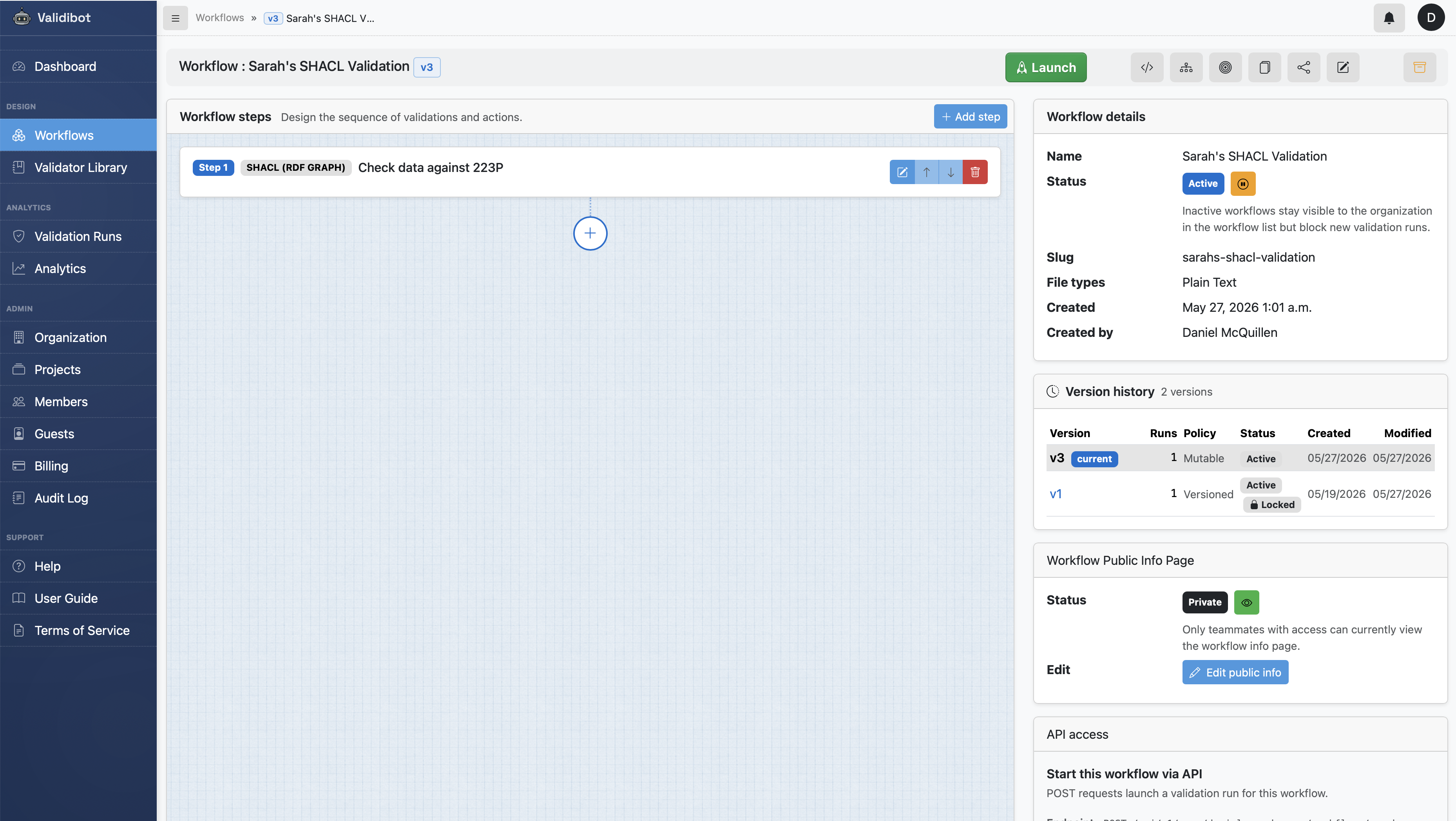
That's the whole setup. Sarah makes the workflow available to her group of contractors, who can now submit their files and correct their earnest but error-prone work themselves.
One thing worth flagging before we move on: this is deliberately the smallest example we could build — one workflow with one step, and one shape inside that step. Real Validibot workflows tend to be larger. A typical setup chains together several steps (parse and check syntax, conform to one or two standards, attest the result, notify a channel), and each validation step usually carries a handful of shapes or SPARQL ASK assertions rather than just one. The pattern doesn't change as you scale; you just add more of each.
Submitting a File
Here's what the contractor's experience looks like. This particular contractor isn't technical, so he doesn't want to use Validibot's API. Instead, he logs into Validibot and navigates to the upload form for Sarah's workflow (he got an email when she shared it with him, letting him know it's available in his Validibot account).
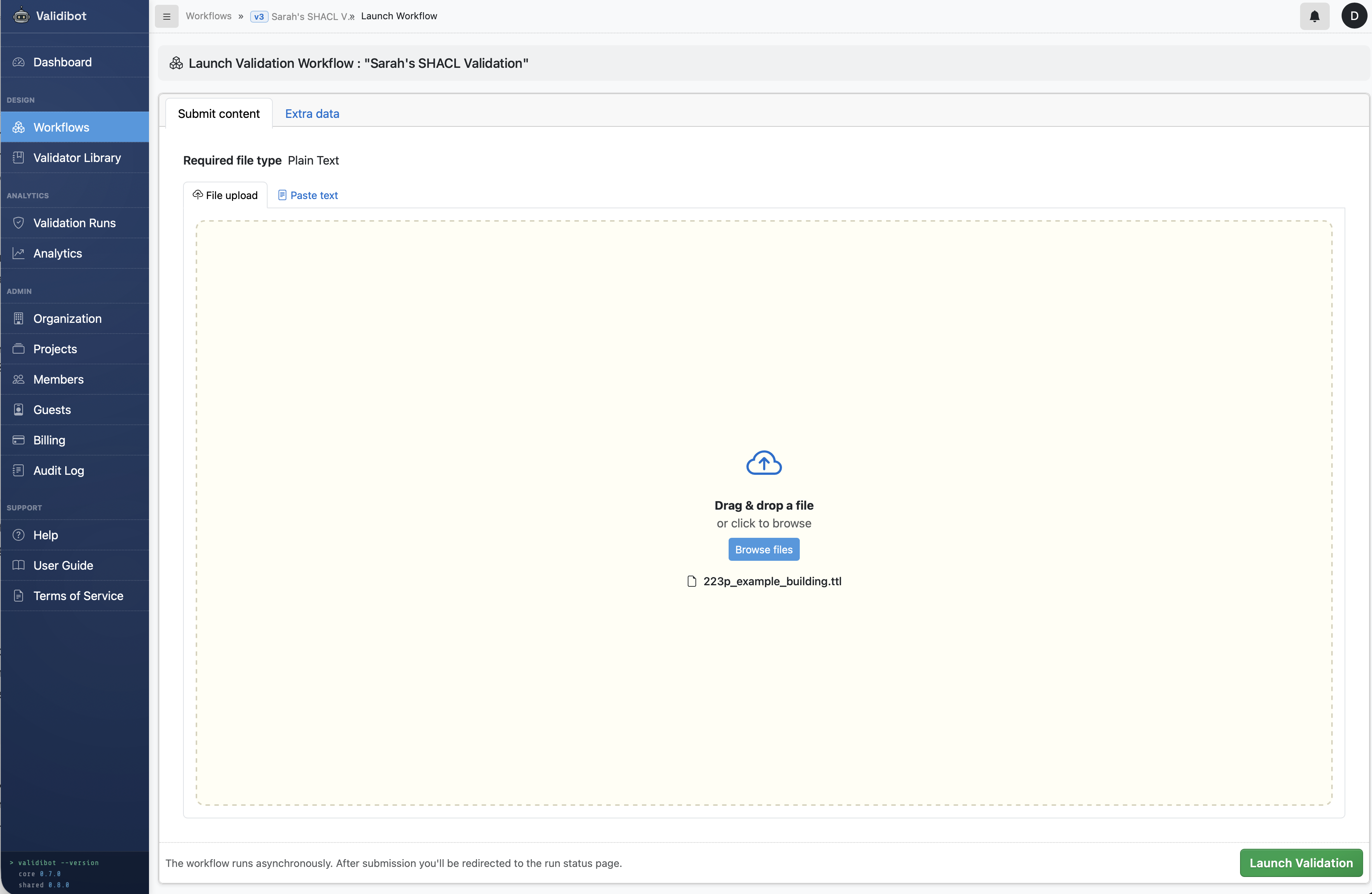
223p_example_building.ttl file or paste the
Turtle text directly. Either way, one click on Launch
Validation kicks off the run.
The contractor pastes his submission into the form and clicks "Launch" and the workflow immediately starts the run. A few seconds later, the result comes back:
- Status: Failed.
- Findings: 1 error, 0 warnings, 0 info.
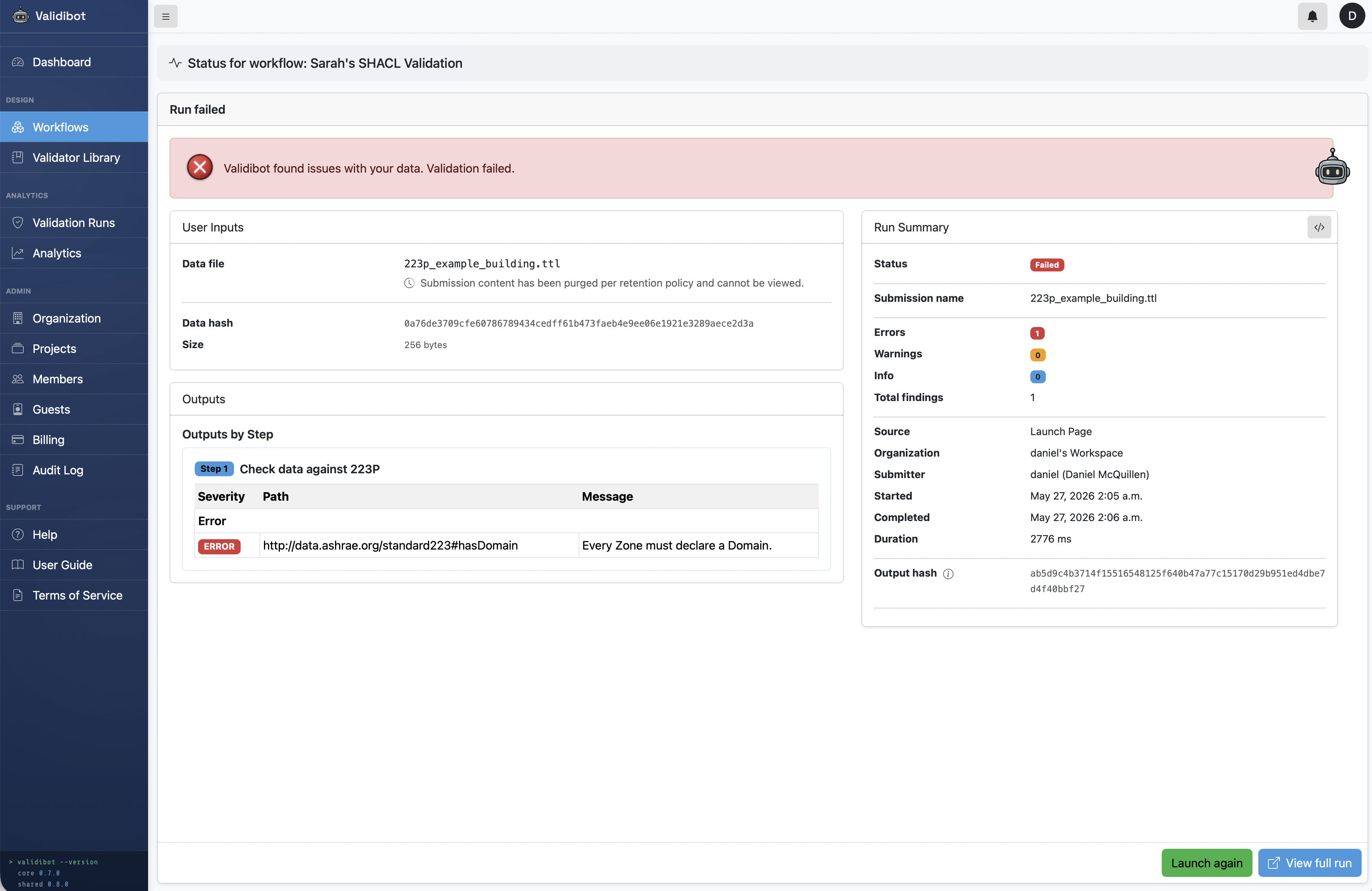
http://data.ashrae.org/standard223#hasDomain)
rather than the prefixed form
(s223:hasDomain) we wrote in the shape.
The Run Summary sidebar on the right
counts errors, warnings, and info findings, and tracks
run timing, source, submitter, and the output hash.
And that's exactly what Sarah wanted. The validator caught the Zone with no declared Domain in the contractor's submission and surfaced our own message so the engineer can give the contractor a clear, actionable note.
If the contractor fixes Zone-102 by adding an
s223:hasDomain triple (for example, pointing it
at s223:Domain-HVAC) and resubmits, the run passes.
The Same Run, via the API
The contractor in our example logged in to the web UI, but
Sarah's workflow is just as accessible to a script or an
integration. A POST to
/api/v1/orgs/<org-slug>/workflows/<workflow-slug>/runs/
with the Turtle file as the request body (Content-Type
text/plain) kicks off an identical run, and the
response carries the same finding in structured JSON form:
POST .../runs/ response
{
  "id": "881249ef-e9d3-43f5-9cc5-9c622c0a77fa",
  "status": "FAILED",
  "state": "COMPLETED",
  "result": "FAIL",
  "source": "API",
  "error_category": "VALIDATION_FAILED",
  "org": "daniels-workspace",
  "user": 1,
  "workflow": 6,
  "workflow_slug": "sarahs-shacl-validation",
  "submission": "39d1ba8a-ab52-4e2d-a956-180508cd8ee7",
  "started_at": "2026-05-27T02:05:58.512000Z",
  "ended_at": "2026-05-27T02:06:01.288000Z",
  "duration_ms": 2776,
  "steps": [
    {
      "step_id": 9,
      "name": "Check data against 223P",
      "status": "FAILED",
      "issues": [
        {
          "id": 59,
          "message": "Every Zone must declare a Domain.",
          "path": "http://data.ashrae.org/standard223#hasDomain",
          "severity": "ERROR",
          "code": "shacl.MinCountConstraintComponent",
          "assertion_id": null
        }
      ],
      "error": "",
      "output_signals": [],
      "template_parameters_used": null,
      "template_warnings": null
    }
  ],
  "error": "One or more validation steps failed.",
  "user_friendly_error": "Validibot found issues with your data. Validation failed.",
  "output_hash": "ab5d9c4b3714f15516548125f640b47a77c15170d29b951ed4dbe7d4f40bbf27"
}
For a caller, the load-bearing fields are status and
result (machine-readable pass/fail at the top
level), user_friendly_error (a one-sentence summary
safe to surface to an end user as-is), and
steps[].issues (the per-finding list, each entry
carrying its severity, path, and the message from the SHACL
shape). output_hash is a stable hash of the run's
output, useful for caching, audit trails, or feeding into a
signed credential.
Going a Bit Further: Project Rules with SPARQL
SHACL shapes are great for "every X needs a Y" patterns where Y
is a direct property of X — like our "every Zone must
declare a Domain" rule, where the s223:hasDomain
link starts at the Zone. SHACL can also express questions that
run the other way using
property paths
like sh:inversePath, but at some point you reach
rules that are easier to write as one-off graph queries than as
another shape file — especially ad-hoc, project-specific
checks ("every HVAC Zone in this project must be served by an
Equipment we already have on file") that don't really belong in
a reusable shape library.
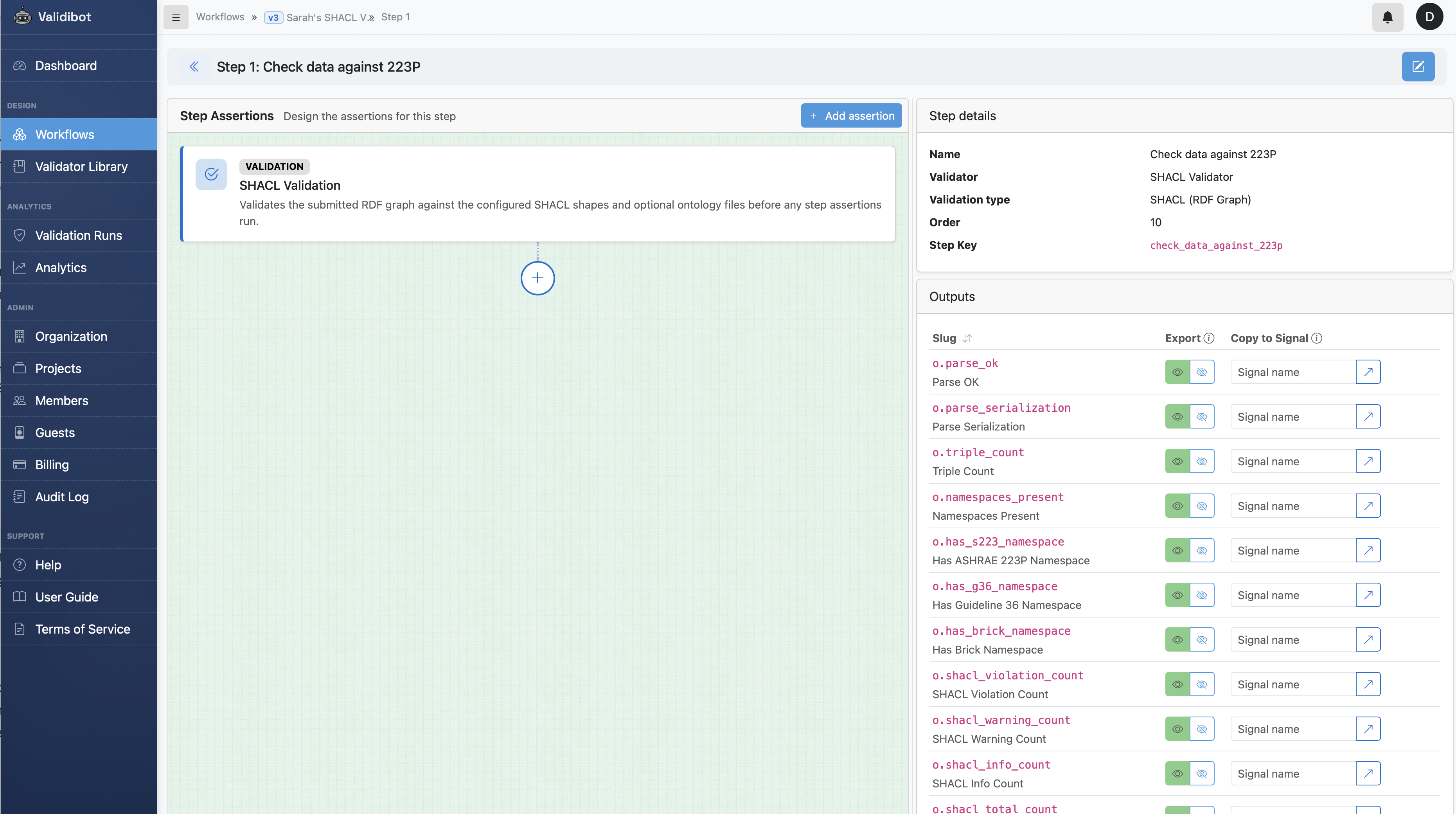
o.parse_ok, o.triple_count,
o.shacl_violation_count, and so on — which
can also be gated on with plain assertions.
For those cases, the SHACL validator lets the workflow author add
SPARQL ASK assertions from the step editor's
Add assertion dialog. On a SHACL validator step,
the first assertion type is SHACL.
SPARQL
is the standard query language for RDF, kind of like
SQL is for relational databases. The SPARQL
ASK query returns a simple true/false answer.6
That answer makes it a natural fit for "must this thing be true?"
checks. So each assertion in the step can be a small query that
returns true if the rule holds and false if it
doesn't.
Our "every HVAC Zone must be served by some Equipment" rule, written as a SPARQL ASK:
SPARQL ASK assertion
PREFIX s223: <http://data.ashrae.org/standard223#>
ASK {
    FILTER NOT EXISTS {
        ?zone a s223:Zone ;
              s223:hasDomain s223:Domain-HVAC .
        FILTER NOT EXISTS {
            ?eq s223:serves ?zone .
        }
    }
}
The double FILTER NOT EXISTS reads as "for every
HVAC Zone, there exists at least one Equipment that serves it."
If even one HVAC Zone in the file has no Equipment serving it,
the query returns false. In our example, AHU-1
serves Zone-101, which happens to be the only
HVAC Zone in the file (Zone-102 doesn't declare a Domain at
all), so this check passes.
One thing to be aware of about SPARQL ASK assertions:
because ASK returns only true or false, a failing
assertion produces a single generic finding ("the rule did not
hold") rather than per-instance findings naming each
non-conforming node. If you wanted Validibot to call out each
unserved HVAC Zone by IRI, that's a job better suited to a
SHACL shape with sh:inversePath s223:serves.
Reach for SPARQL ASK when the question itself is the answer
you care about; reach for a SHACL shape when you want the
engine to enumerate offenders.
Sarah can add as many of these as she needs to a single validation step. Building up a useful set of assertions one at a time is a little manual today — we're looking at bulk editing for a future release.
What If You Use the Same Rules on Every Project?
Uploading the same shapes and ontology files into every workflow gets old quickly. If a firm checks every contractor delivery against the same baseline rules, those rules can be saved once as a library validator. Other workflows in the same organisation can then pick up the same rules without re-uploading.
That's a topic for another post. For this one, the upload-per-workflow path covers what most people will want to do first.
What This Doesn't Do
It's worth being clear about what a SHACL check is not.
SHACL checks the structure of the data: it checks that the zones, equipment, and connections are described in the right shape. It doesn't check whether the building was actually built the way the file claims, and it doesn't check whether the HVAC design is any good. Those are different questions for different tools.
What SHACL does, with the help of the additional SPARQL assertions, is give Sarah a fast, repeatable, documented check that the file she received follows the rules her firm cares about.
Where to Go From Here
We've kept this example deliberately tiny. The same workflow scales up to the real 223P shapes, your firm's project-specific rules, Brick Schema, Project Haystack, or any other RDF-based standard. The pattern doesn't change: upload your shapes and ontology, run the file through the workflow, look at the findings.
Want to give it a try? Get in touch and we'll get you started running Validibot on your own machine.